
ToDesk Overseas Remote Usability and Comparison With Similar Alternatives
Students, business travelers, and cross-border professionals care most about whether ToDesk works well overseas, whether connecting back to China stays stable, and how it stacks up against AnyDesk, TeamViewer, and Sunlogin. Based on real-world scenarios, this guide reviews overseas usability and compares the alternatives.

Can ToDesk Be Used in Hong Kong
Yes, it works normally. ToDesk supports global connections, and Hong Kong users can simply download the official version to control devices remotely or be connected to.
One thing to note is that +852 Hong Kong phone numbers currently cannot be bound for registration; official support clearly states that only mainland China numbers are supported. Hong Kong users can work around this by registering with an international email address (Gmail, Outlook, Yahoo), and they can also sign in by scanning a QR code in the App or through WeChat third-party login. The connection itself is not restricted by region; only phone-number binding is unfriendly to Hong Kong users.
Does ToDesk Work Normally in Taiwan
Yes. ToDesk can be downloaded and used normally in Taiwan, the iOS version has an official listing in the Taiwan App Store with no Chinese account required, and global connections are officially supported.
The only point to watch: +886 Taiwan phone numbers currently cannot be bound for registration, and official support states that only mainland China numbers are supported. Taiwan users can register and sign in with an international email address (Gmail, Outlook) instead; email also works for password recovery and login verification, or you can scan a QR code in the App or use WeChat quick login.
Can ToDesk Be Used in Singapore
Yes, it can. ToDesk supports global connections, and Singapore devices can remote into and out of China.
The limits fall mainly in two areas: first, overseas phone numbers such as +65 cannot be bound for registration, so you need to use an international email address (Gmail, Outlook) instead; second, the free version only uses standard routes for cross-border connections, with noticeable latency and lag, and getting an optimized route requires separately purchasing the paid global node plugin. The connection feature itself is not blocked by region.
Can ToDesk Be Used in Malaysia
Yes. ToDesk supports every platform and global connections, so Malaysia users can simply download the official version.
Overseas phone numbers cannot be bound during registration, so we recommend registering directly with an international email address (Gmail, Outlook, Yahoo); email likewise works for password recovery and login verification, and you can also sign in by scanning a QR code in the App or through WeChat. For stable, low-latency remote access across borders, the free version only uses standard routes, so you need to pay for the global node plugin to get an optimized route.
Can ToDesk Connect Normally in Thailand
Yes. ToDesk lets devices inside and outside China remote into each other, and Thailand users can simply download the official version to connect.
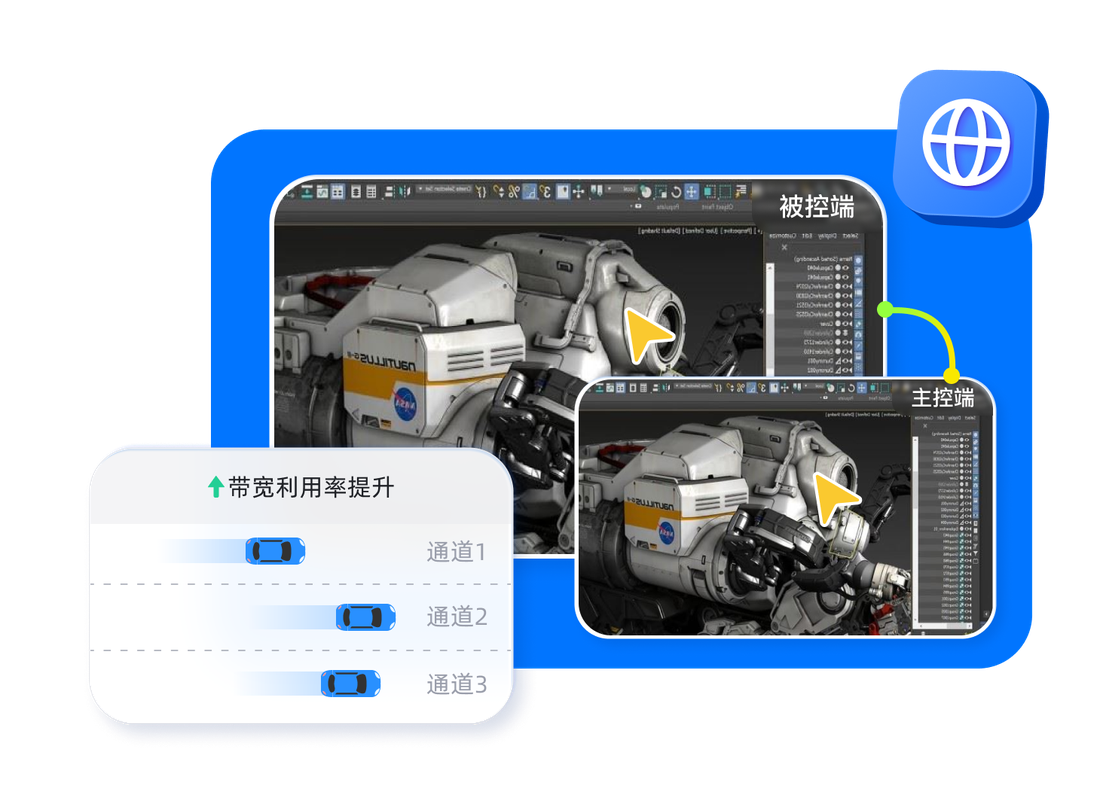
We recommend registering with an international email address (Gmail, Outlook), because overseas phone numbers cannot be bound. Note that the free version only uses standard routes for cross-border connections, so latency and lag will be more noticeable than on a local network; if you need stable low latency, consider the paid global node plugin, which the company says deploys more than 200 nodes and switches to a backup in about 1 second on failure.
Can ToDesk Be Used in Vietnam
ToDesk supports global connections, Vietnam devices can remote into and out of China, and the source materials mention no blocking issues in Vietnam.
Overseas phone numbers cannot be bound during registration, so please register with an international email address (Gmail, Outlook). The free version uses standard routes for cross-border connections with higher latency; for more stability you can pay for the global node plugin. As for whether the local network imposes additional blocking, you should confirm this through your own testing.
Can ToDesk Be Used in Indonesia
Yes. ToDesk supports every platform and global connections, so Indonesia users can simply download the official version for remote access.
Please register with an international email address instead (Gmail, Outlook, Yahoo), because overseas phone numbers such as those in Indonesia cannot be bound; email also works for password recovery and login verification. For cross-border remote access, the free version only uses standard routes with higher latency, and getting an optimized route requires separately purchasing the paid global node plugin.
Does ToDesk Work Normally in the Philippines
Yes. ToDesk lets devices inside and outside China connect to each other, and Philippines users can simply download the official version to use it.
Overseas phone numbers cannot be bound for registration, so we recommend registering with an international email address (Gmail, Outlook), or signing in by scanning a QR code in the App or through WeChat. For cross-border connections, the free version uses standard routes with higher latency; when you need more stable low latency, you can pay for the global node plugin.
How Does the ToDesk Overseas Version Differ From the Domestic Version
ToDesk has no separate overseas version. Inside and outside China people use the same official version, which you can download from todeskremote.com or the official app stores.
The differences are at the usage level: first, overseas phone numbers cannot be bound for registration, so overseas users must switch to an international email address; second, the free version only uses standard routes for cross-border connections, and getting an optimized route with low latency requires paying for the global node plugin (the controlled device needs to be upgraded to V4.6.1.0 or later). The features themselves are identical inside and outside China.
Is There a Version Made Specifically for Overseas Users
There is no dedicated overseas version. Everyone worldwide uses the same official version on todeskremote.com.
What overseas users should note: overseas phone numbers cannot be bound, so you need to register with an international email address (Gmail, Outlook); for stable low latency across borders you need to pay for the professional feature called Global Node, since the free version only uses standard routes. In other words, going overseas does not mean switching versions, but rather registering with email plus paying for global nodes when needed.
Can You Use ToDesk Abroad to Connect Back to a Computer in China
Yes. ToDesk officially supports global connections, devices abroad and computers inside China can remote into each other, and the account limit applies only to binding an overseas phone number, not to the connection itself.
In practice: install ToDesk on the computer in China and sign in, or provide its device code plus a temporary password, then start the connection from your email-registered account overseas. The free version uses standard routes for cross-border connections and will be laggier, so for a smooth experience you can pay for the global node plugin.
Connecting From Taiwan Back to a Home Computer in Mainland China
You can connect, but whether it is smooth depends on whether you pay. ToDesk supports cross-border connections between Taiwan and mainland China, and the connection feature is not restricted.
The free version only uses standard routes for cross-border connections, with noticeable latency and lag, suitable for low-interaction tasks such as viewing data and transferring files; for smooth low latency you need to pay for the global node plugin (the controlled device needs to be upgraded to V4.6.1.0 or later), which the company says deploys more than 200 nodes. Remember to register with an international email address, because Taiwan phone numbers cannot be bound.
Will It Lag When Connecting From Hong Kong Back to a Company Computer in Shenzhen
You can connect; whether it lags depends on the route. ToDesk supports cross-border connections from Hong Kong to Shenzhen, but the free version only uses standard routes for cross-border connections, so high-motion images will lag and control will feel less responsive, while viewing documents and transferring files are acceptable.
For more stable low latency, you need to pay for the global node plugin (the controlled device upgraded to V4.6.1.0 or later). In addition, the free version caps image quality at 1080P and the refresh rate at 30Hz, so it is not high-definition to begin with.
Will Cross-Border Remote Access With ToDesk Be Very Laggy or Have Image Latency
The ToDesk free version does tend to lag across borders. The free version only uses standard routes for cross-border connections, with more noticeable latency and lag, and with the refresh rate capped at 30Hz and image quality only at smooth or low definition, high-motion scenes will clearly feel unresponsive.
To improve this you need to pay for the global node plugin to use an optimized route (the company says more than 200 nodes, switching to a backup in about 1 second on failure); the Performance and High-Performance versions are officially rated at end-to-end latency under 3ms. For low-interaction needs such as viewing data and transferring files, the free version is still acceptable.
References:Statista Remote Work Data · Wikipedia - Remote Desktop Software · ToDesk Official Website
Frequently Asked Questions
Below are common questions and answers about "ToDesk Overseas Remote Usability and Comparison With Similar Alternatives". Tap any to expand.
Can ToDesk be used in Hong Kong?
Yes, it works normally. ToDesk supports global connections, and Hong Kong users can simply download the official version to control devices remotely or be connected to. One thing to note is that +852 Hong Kong phone numbers currently cannot be bound for registration; official support clearly states that only mainland China numbers are supported. Hong Kong users can work around this by registering with an international email address (Gmail, Outlook, Yahoo), and they can also sign in by scanning a QR code in the App or through WeChat third-party login. The connection itself is not restricted by region; only phone-number binding is unfriendly to Hong Kong users.
Does ToDesk work normally in Taiwan?
Yes. ToDesk can be downloaded and used normally in Taiwan, the iOS version has an official listing in the Taiwan App Store with no Chinese account required, and global connections are officially supported. The only point to watch: +886 Taiwan phone numbers currently cannot be bound for registration, and official support states that only mainland China numbers are supported. Taiwan users can register and sign in with an international email address (Gmail, Outlook) instead; email also works for password recovery and login verification, or you can scan a QR code in the App or use WeChat quick login.
Can ToDesk be used in Singapore? Will it be restricted?
Yes, it can. ToDesk supports global connections, and Singapore devices can remote into and out of China. The limits fall mainly in two areas: first, overseas phone numbers such as +65 cannot be bound for registration, so you need to use an international email address (Gmail, Outlook) instead; second, the free version only uses standard routes for cross-border connections, with noticeable latency and lag, and getting an optimized route requires separately purchasing the paid global node plugin. The connection feature itself is not blocked by region.
Can ToDesk be used in Malaysia?
Yes, it can. ToDesk supports every platform and global connections, so Malaysia users can simply download the official version. Overseas phone numbers cannot be bound during registration, so we recommend registering directly with an international email address (Gmail, Outlook, Yahoo); email likewise works for password recovery and login verification, and you can also sign in by scanning a QR code in the App or through WeChat. For stable, low-latency remote access across borders, the free version only uses standard routes, so you need to pay for the global node plugin to get an optimized route.
Can ToDesk connect normally in Thailand?
Yes. ToDesk lets devices inside and outside China remote into each other, and Thailand users can simply download the official version to connect. We recommend registering with an international email address (Gmail, Outlook), because overseas phone numbers cannot be bound. Note that the free version only uses standard routes for cross-border connections, so latency and lag will be more noticeable than on a local network; if you need stable low latency, consider the paid global node plugin, which the company says deploys more than 200 nodes and switches to a backup in about 1 second on failure.
Can ToDesk be used in Vietnam? Will it be blocked?
ToDesk supports global connections, Vietnam devices can remote into and out of China, and the source materials mention no blocking issues in Vietnam. Overseas phone numbers cannot be bound during registration, so please register with an international email address (Gmail, Outlook). The free version uses standard routes for cross-border connections with higher latency; for more stability you can pay for the global node plugin. As for whether the local network imposes additional blocking, you should confirm this through your own testing.
Can ToDesk be used in Indonesia?
Yes. ToDesk supports every platform and global connections, so Indonesia users can simply download the official version for remote access. Please register with an international email address instead (Gmail, Outlook, Yahoo), because overseas phone numbers such as those in Indonesia cannot be bound; email also works for password recovery and login verification. For cross-border remote access, the free version only uses standard routes with higher latency, and getting an optimized route requires separately purchasing the paid global node plugin.
Does ToDesk work normally in the Philippines?
Yes. ToDesk lets devices inside and outside China connect to each other, and Philippines users can simply download the official version to use it. Overseas phone numbers cannot be bound for registration, so we recommend registering with an international email address (Gmail, Outlook), or signing in by scanning a QR code in the App or through WeChat. For cross-border connections, the free version uses standard routes with higher latency; when you need more stable low latency, you can pay for the global node plugin.
How does the ToDesk overseas version differ from the domestic version?
ToDesk has no separate overseas version. Inside and outside China people use the same official version, which you can download from todeskremote.com or the official app stores. The differences are at the usage level: first, overseas phone numbers cannot be bound for registration, so overseas users must switch to an international email address; second, the free version only uses standard routes for cross-border connections, and getting an optimized route with low latency requires paying for the global node plugin (the controlled device needs to be upgraded to V4.6.1.0 or later). The features themselves are identical inside and outside China.
Is there a version made specifically for overseas users?
There is no dedicated overseas version. Everyone worldwide uses the same official version on todeskremote.com. What overseas users should note: overseas phone numbers cannot be bound, so you need to register with an international email address (Gmail, Outlook); for stable low latency across borders you need to pay for the professional feature called Global Node, since the free version only uses standard routes. In other words, going overseas does not mean switching versions, but rather registering with email plus paying for global nodes when needed.
Can you use ToDesk abroad to connect back to a computer in China?
Yes. ToDesk officially supports global connections, devices abroad and computers inside China can remote into each other, and the account limit applies only to binding an overseas phone number, not to the connection itself. In practice: install ToDesk on the computer in China and sign in, or provide its device code plus a temporary password, then start the connection from your email-registered account overseas. The free version uses standard routes for cross-border connections and will be laggier, so for a smooth experience you can pay for the global node plugin.
Connecting from Taiwan back to a home computer in mainland China, is ToDesk smooth?
You can connect, but whether it is smooth depends on whether you pay. ToDesk supports cross-border connections between Taiwan and mainland China, and the connection feature is not restricted. The free version only uses standard routes for cross-border connections, with noticeable latency and lag, suitable for low-interaction tasks such as viewing data and transferring files; for smooth low latency you need to pay for the global node plugin (the controlled device needs to be upgraded to V4.6.1.0 or later), which the company says deploys more than 200 nodes. Remember to register with an international email address, because Taiwan phone numbers cannot be bound.
Will it lag when connecting from Hong Kong back to a company computer in Shenzhen?
You can connect; whether it lags depends on the route. ToDesk supports cross-border connections from Hong Kong to Shenzhen, but the free version only uses standard routes for cross-border connections, so high-motion images will lag and control will feel less responsive, while viewing documents and transferring files are acceptable. For more stable low latency, you need to pay for the global node plugin (the controlled device upgraded to V4.6.1.0 or later). In addition, the free version caps image quality at 1080P and the refresh rate at 30Hz, so it is not high-definition to begin with.
Will cross-border remote access with ToDesk be very laggy or have image latency?
The ToDesk free version does tend to lag across borders. The free version only uses standard routes for cross-border connections, with more noticeable latency and lag, and with the refresh rate capped at 30Hz and image quality only at smooth or low definition, high-motion scenes will clearly feel unresponsive. To improve this you need to pay for the global node plugin to use an optimized route (the company says more than 200 nodes, switching to a backup in about 1 second on failure); the Performance and High-Performance versions are officially rated at end-to-end latency under 3ms. For low-interaction needs such as viewing data and transferring files, the free version is still acceptable.
Will the overseas ToDesk free version be speed-limited?
The overseas ToDesk free version is speed-limited, and it is more noticeable across borders. Community feedback and hands-on tests widely report that the free version has its network speed directly limited, so high-motion images will lag and drop packets; on top of that, the free version only uses standard routes for cross-border connections, with higher latency. The official documentation explicitly states limits on the number of sessions, duration, and image quality and frame rate, but does not state speed limiting in writing; speed limiting is the common impression from community testing. Bypassing it essentially means only paying to upgrade or buying the global node plugin, with no reliable free workaround.
What is the ToDesk free version speed cap, and is it enough for cross-border use?
ToDesk has not officially published a clear speed-cap figure; the documentation only lists image quality and frame rate (capped at 1080P low definition, 30Hz/30FPS) and monthly quotas (since March 2025, up to 200 connections and 80 hours per month). Hands-on tests have found 2D game packet loss reaching about 30 percent. Adding the latency of using only standard routes across borders, the free version suits viewing data, transferring files, and infrequent temporary use; for frequent, long-duration use or smooth visuals it is not enough, and you need to pay.
Do you need a Chinese phone number to register a ToDesk account overseas?
Registering ToDesk overseas does not necessarily require a Chinese phone number, but if you use a phone number, it almost has to be a Chinese one. Official support clearly states that currently only mainland China phone numbers can be bound, and overseas numbers such as +852 and +886 cannot be bound. The common approach for overseas users is to register with an international email address (Gmail, Outlook, Yahoo) instead; email also works for password recovery and login verification, and you can additionally sign in by scanning a QR code in the App or through WeChat third-party login, with no Chinese phone number needed at all.
Without a Chinese phone number, can you register ToDesk abroad?
Yes. Without a Chinese phone number, register with an international email address instead: international email addresses such as Gmail, Outlook, and Yahoo can all receive the verification message to complete registration. The flow is to enter your email, send the verification code, and finish after verification. Email can also be used for password recovery and login verification on new devices. In addition, you can sign in by scanning a QR code in the ToDesk App or through WeChat third-party login. Overseas phone numbers cannot be bound because the company only supports mainland numbers, so the email channel is the standard overseas solution.
Can ToDesk be registered with an overseas phone number (+852/+886/+65)?
No, ToDesk cannot be registered with an overseas phone number. The official forum and support clearly state that currently only mainland China phone numbers can be bound, and overseas numbers such as +852 (Hong Kong), +886 (Taiwan), and +65 cannot be bound for registration. Overseas users should register and sign in with an international email address (Gmail, Outlook, Yahoo) instead; email can also recover passwords and handle login verification, or you can scan a QR code in the App or use WeChat login, all of which bypass the phone-number limit.
Can ToDesk be registered with email, without a phone number?
Yes. ToDesk supports registering with an email address plus an email verification code. The flow is to enter your email, send the verification code, and finish registration after verification, with no phone number needed at all. International email addresses such as Gmail, Outlook, and Yahoo can all receive the verification message, and email can also be used for password recovery and login verification on new devices. This is also the standard way for overseas users to work around the fact that overseas phone numbers cannot be bound.
What should you do if a Taiwan phone number cannot receive the ToDesk verification code overseas?
This is normal, because the company currently only supports binding mainland China phone numbers, so +886 Taiwan numbers cannot be bound in the first place and naturally cannot receive the verification code. The solution is to register and sign in with an international email address (Gmail, Outlook, Yahoo) instead, which can receive the verification message normally and can also be used for password recovery; or switch to scanning a QR code in the ToDesk App or using WeChat third-party login. There is no need to keep struggling with phone text messages.